



Table of Contents
Key Points
- Microsoft Word templates help translators save time and reduce reformatting work
- Translation templates improve consistency across recurring documents
- Custom Word templates are ideal for certificates, agreements, and quotes
- Saving templates in Word streamlines long-term translation workflows
Introduction
Do you spend hours translating documents only to reformat them afterward? Using Microsoft Word templates for translation can significantly reduce this extra work. Depending on the type of document you are translating, there is often a ready-made template in Word—or the option to create your own—that helps you translate faster and more efficiently.
How to Access Microsoft Word Templates for Translation
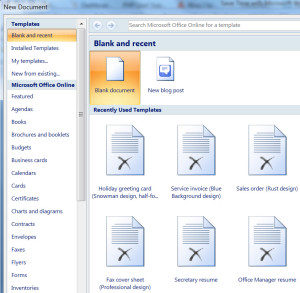
Accessing Microsoft templates in Word is straightforward. Open a Word document, click File, then select New from Template. You will see a list of available templates based on your version of Microsoft Office.
Using a predefined template for translation allows you to focus on linguistic accuracy instead of formatting, which is especially useful for repetitive translation projects.
Why Built-in Templates Save Time
Built-in templates already include structured layouts, fonts, and spacing. This means translators can begin working immediately without adjusting margins, headings, or formatting styles.
Common Types of Microsoft Word Templates
Microsoft Word offers templates for a wide range of document types, including:
- Letters
- Invoices
- Business reports
- Resumes
- Proposals
- Agendas
- Certificates
For example, when translating official documents, using a template of translation such as a birth certificate or marriage license layout can save significant time on formatting.
Creating Your Own Translation Template
If existing Microsoft Word templates do not meet your needs, creating a custom translation template is a practical solution. When completing a frequently translated document, save the structure for future use.
Leave standard text unchanged and create blank spaces for variable information such as names, dates, and addresses. This approach ensures consistency while reducing repetitive work.
Best Practices for Custom Translation Templates
When creating templates for translation:
- Keep fixed legal or official text unchanged
- Leave editable fields clearly marked
- Use consistent formatting across all templates
This method works well for client agreements, translation quotes, and certified documents.
Now you are ready to save your own Microsoft word template.
Related: How to Hyperlink Text in Microsoft Word
How to Save a Template in Word
Once your document layout is complete, click Save As under the File tab and select Save as Template. This creates a file with a .dotx extension. Store it in the Templates or Trusted Templates folder so it can be reused easily.
This process answers one of the most common questions translators ask about saving templates in Word.
Why are Templates Useful for Translators?
Templates help translators eliminate repetitive formatting tasks and improve productivity. Instead of translating first and formatting later, translators can work directly within a structured template.
This workflow reduces errors, ensures consistency, and shortens turnaround time—especially for high-volume projects.
What Translation Excellence Provides
At Translation Excellence, we offer a comprehensive range of translation templates designed to meet the specific needs of your projects.
For more information about Microsoft Word Templates, click here. To read our previous tip-of-the-week posts, please click here.
Do you use templates when you translate documents? Let us know what works for you in the comments!
FAQs
How do you AutoSave time in Word?
Using templates and AutoSave together reduces manual work and prevents data loss during translation.
When creating documents, how do templates save time?
Templates eliminate repetitive formatting and allow translators to focus on content rather than layout.
How do I save a Microsoft Word document as a template?
Use Save As and select the template format (.dotx) in Word.
How do Microsoft Word templates work?
Templates provide predefined layouts that can be reused for similar documents, ensuring consistency and speed.
Related: An Introduction to Creating Shapes in Microsoft Word